DESCRIPTION
GENERAL INFORMATION
The Lancair Legacy is a two-seat, high-performance, single-engine, low-wing experimental aircraft built with a carbon-fiber composite structure and retractable tricycle landing gear. Designed by Lancair International and introduced in 1999, the Legacy became well known for its speed, efficiency, and sleek appearance. Independent evaluation by the CAFÉ Foundation reported that no aircraft they had tested had scored such high marks in all areas.
Standard Legacy aircraft are commonly powered by the Continental IO-550N engine with a three-blade constant-speed propeller, while some builders use turbocharged TSIO-550 configurations for increased high-altitude performance. Because the Legacy is an experimental aircraft, individual examples can vary significantly depending on builder choices, avionics, interior layout, engine configuration, and performance upgrades.
SIMULATION INFORMATION
The Lancair Legacy for MSFS 2024 has been developed to bring this fast, highly customized aircraft into the simulator with multiple configurations, realistic handling, and a deeper ownership experience. The package includes the standard Lancair Legacy glass cockpit, an analog panel version, and the award-winning StarHawk Legacy, each offered in both turbocharged and naturally aspirated configurations.
This project was created in collaboration with 3DR, who produced an amazing exterior and interior model with photorealistic textures. We also worked directly with the owner of STARHAWK, a Lancair Legacy celebrated for its extensive refinements, earning EAA Grand Champion honors as well as the prestigious Stan Dzik Memorial Award for Outstanding Design Contribution. STARHAWK’s builder provided extensive design information, 3D scans, photos, videos, sound recordings, performance analyses, and direct participation in flight dynamics and handling development. This close involvement, along with additional scanning by Flysimware, allowed us to capture the aircraft with exceptional accuracy, from exterior details to cockpit switches, knobs, controls, and system behavior.
The sound package was developed with SimAcoustics, using recordings from a real Lancair Legacy to create a highly accurate engine sound experience. From startup to cruise power, the goal was to capture the unique character of the aircraft and bring the user closer to the real machine.
A major part of this product is our new TrueSim technology, designed to give us deeper control over how the aircraft behaves beyond the default simulator systems. TrueSim allows us to model engine behavior, turbocharged mixture logic, fuel system behavior, failures, maintenance, and wear-and-tear in a more realistic way, so the aircraft does not always behave as if every component is perfectly healthy. For users who prefer a simpler experience, these realism features can be adjusted or disabled.
The turbocharged variants include custom mixture and supercharger-style logic designed to create more realistic high-altitude operation. This helps the aircraft respond more naturally as altitude, RPM, and power settings change, including the need to properly manage and lean the mixture during high-altitude flight.
The aircraft tablet is integrated into the default MSFS 2024 EFB environment and includes several pages for aircraft setup, failures, maintenance, and system management. Users can manage the aircraft’s condition, service wear items, wash dirt and debris from the exterior, service tire-related conditions, and handle failure options directly through the tablet. The included fuel page also allows fueling from any airport location, giving users more flexibility than the default simulator fueling system.
Ground service behavior has also been expanded beyond simple default simulator functions. Fuel truck and GPU-related ground support are handled with custom logic, helping the aircraft feel more alive while parked, serviced, or prepared for flight.
The Legacy also uses modern MSFS 2024 systems, including modern fuel, hydraulic, and electrical systems built to closely match the real aircraft. The electrical system includes real-world circuits, fuses, and circuit breakers depending on the selected variant, with glass panel versions using fuses and analog panel versions using circuit breakers. Glass panel variants also include fuse drawer behavior, with failed fuses able to illuminate for easier troubleshooting. These systems are designed around the real aircraft layout rather than simplified default behavior.
The real Lancair Legacy uses free-castering nosewheel steering, which requires differential braking and proper rudder pedal hardware for realistic ground handling. To make the aircraft enjoyable for more users, we are also including steering-enabled variants for pilots who do not have toe brakes or prefer a simpler ground handling setup. This allows users to choose the level of realism that best matches their hardware and flying style.
To improve compatibility with a wide range of flight simulation hardware, the aircraft also includes Flysimware’s integrated hardware binding interface using the default in games panel. This system allows users to assign custom aircraft controls and modern MSFS 2024 systems directly to their hardware without requiring third-party LVAR binding utilities. It also restores access to custom functions that are not available through the simulator’s default control assignments, providing a more complete hardware integration experience.
FEATURES
MODEL VARIATION
36 Total Aircraft Variations — 9 Panel Configurations, Each with Standard, Turbo, Steering, and Turbo + Steering Options
Glass Cockpit Configurations
Analog Cockpit Configurations
AVIONIC VARIATION
PAINT THEMES
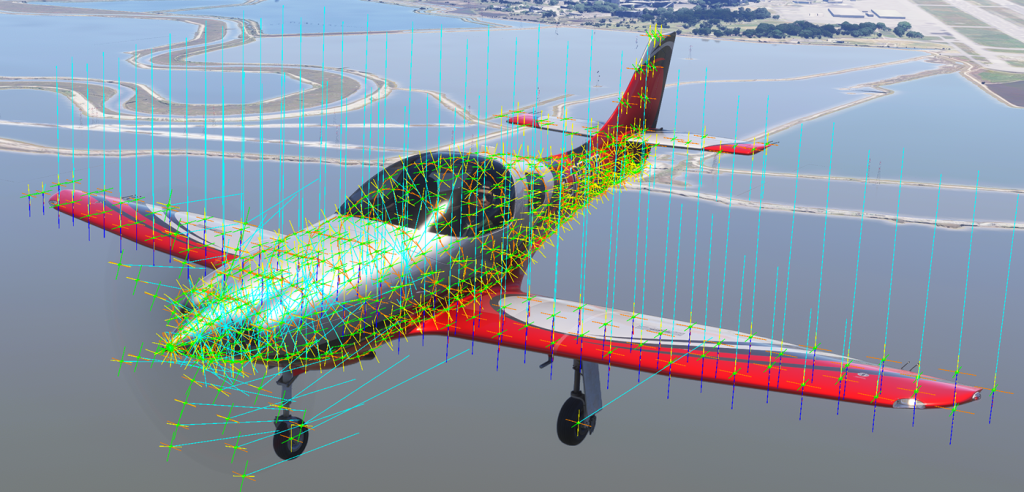
TrueSim – Design Activation
Advanced EA1 aerodynamic surfaces define the aircraft’s true shape, allowing MSFS 2024 to more accurately simulate how airflow interacts with the aircraft.
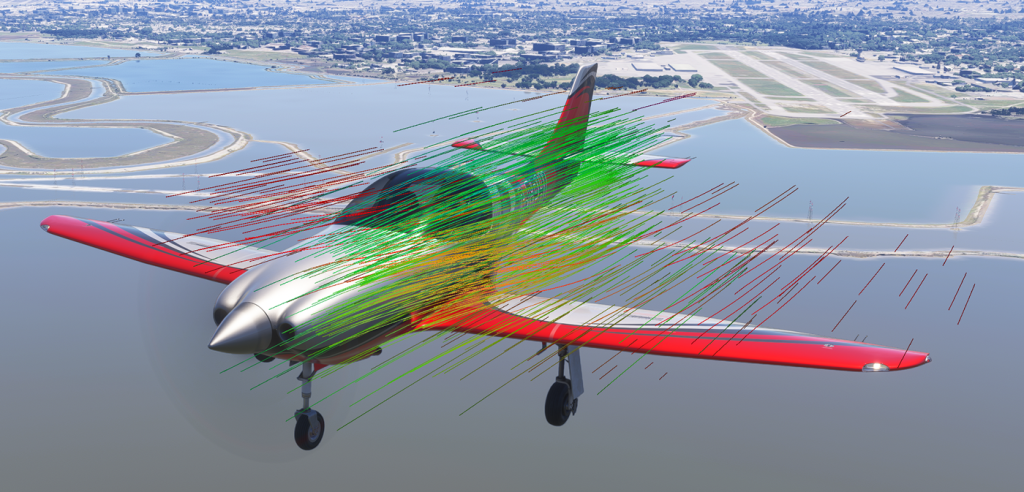
TrueSim – Computational Fluid Dynamics (CFD)
Advanced CFD simulation calculates how air flows around the aircraft, improving aerodynamic realism, handling, and responsiveness during flight.
Advanced Aircraft for MSFS2024 (Flysimware TrueSim – Under the Hood)
Pilot Manual
October 20, 2026 Version 1.8
MSFS PC & Xbox help files
Marketplace customers can download this help package to access the files not included with the Marketplace version of the product. This zip contains the aircraft manual, EULA, tools, and other important information and documentation.
HOW TO GET UPDATES!
TO GET AN UPDATE OPEN YOU UPDATER APP AND ON THE MY DOWNLOADS PAGE CLICK THE UPDATE BUTTON IF IT DISPLAYS IT. FOR MORE INFO READ THE INSTRUCTIONS ON THE UPDATER APP DOWNLOAD PAGE FROM THE STORE.
IF YOU GET AN INSTALLATION ERROR CONTACT US ON OUR CONTACT FORM AND WE WILL TRY TO RESOLVE THE ISSUE.